

Achieve the HPE7-A02 Exam Best Results with Help from HP Certified Experts
Provide HPE7-A02 Practice Test Engine for Preparation
HPE7-A02 exam covers a wide range of topics related to network security, including wireless security, firewall technology, intrusion prevention systems, and VPN solutions. It is intended for IT professionals who have experience in designing, implementing, and managing network security solutions in large and complex environments. Aruba Certified Network Security Professional Exam certification is also suitable for those who are looking to advance their careers in the field of network security and want to showcase their expertise to potential employers.
HP HPE7-A02 exam covers a range of topics related to network security, including firewall technologies, intrusion detection and prevention, secure access technologies, and advanced authentication and authorization. HPE7-A02 exam is designed to test the candidate's ability to design, implement, and manage secure networks using Aruba products and technologies.
NEW QUESTION # 21
A company has HPE Aruba Networking gateways that implement gateway IDS/IPS. Admins sometimes check the Security Dashboard, but they want a faster way to discover if a gateway starts detecting threats in traffic.
What should they do?
- A. Set up Webhooks that are attached to the HPE Aruba Networking Central Threat Dashboard.
- B. Use Syslog to integrate the gateways with HPE Aruba Networking ClearPass Policy Manager (CPPM) event processing.
- C. Integrate HPE Aruba Networking ClearPass Device Insight (CPDI) with Central and schedule hourly reports.
- D. Set up email notifications using HPE Aruba Networking Central's global alert settings.
Answer: D
Explanation:
1. The Need for Faster Threat Notifications
Admins need immediate alerts when threats are detected by the gateway's IDS/IPS functionality. Regularly checking the Security Dashboard is inefficient, so an automated notification system is essential for faster response times.
2. Explanation of Each Option
A: Set up Webhooks that are attached to the HPE Aruba Networking Central Threat Dashboard:
* Incorrect:
* Webhooks are useful for integrating alerts with third-party tools or custom workflows. However, setting up email notifications through global alert settings is faster and simpler for this purpose.
B: Use Syslog to integrate the gateways with HPE Aruba Networking ClearPass Policy Manager (CPPM) event processing:
* Incorrect:
* Syslog integration with CPPM is typically used for logging and correlating events, not for real- time notifications about threats.
* CPPM is better suited for policy enforcement, not instant threat alerts.
C: Set up email notifications using HPE Aruba Networking Central's global alert settings:
* Correct:
* HPE Aruba Networking Central has global alert settings that allow admins to configure email notifications for specific events, such as threat detection.
* This is the simplest and most effective way to ensure admins receive immediate notifications when threats are detected by the gateways.
D: Integrate HPE Aruba Networking ClearPass Device Insight (CPDI) with Central and schedule hourly reports:
* Incorrect:
* While CPDI integration provides enhanced device profiling, it is not directly tied to gateway IDS
/IPS threat detection.
* Hourly reports are not real-time notifications and would not meet the requirement for faster threat alerts.
Final Recommendation
Setting up email notifications through HPE Aruba Networking Central's global alert settings provides the most direct and efficient solution for immediate threat detection alerts.
References
* HPE Aruba Networking Central Alert Management Documentation.
* Aruba IDS/IPS and Security Dashboard Configuration Guide.
* Email Notification Setup for Aruba Central Threat Alerts.
NEW QUESTION # 22
Your company wants to implement Tunneled EAP (TEAP).
How can you set up HPE Aruba Networking ClearPass Policy Manager (CPPM) to enforce certificated-based authentication for clients using TEAP?
- A. For the service using TEAP, set the authentication source to an internal database.
- B. Create an authentication method named "TEAP" with the type set to EAP-TLS.
- C. Select a service certificate when you specify TEAP as a service's authentication method.
- D. Select an EAP-TLS-type authentication method for the TEAP method's inner method.
Answer: D
Explanation:
To set up HPE Aruba Networking ClearPass Policy Manager (CPPM) to enforce certificate-based authentication for clients using Tunneled EAP (TEAP), you need to select an EAP-TLS-type authentication method for TEAP's inner method. TEAP allows for a combination of certificate-based (EAP-TLS) and password-based (EAP-MSCHAPv2) authentication. By choosing EAP-TLS as the inner method, you ensure that the clients are authenticated using their certificates, thus enforcing certificate-based authentication within the TEAP framework.
Reference: Aruba ClearPass documentation provides detailed steps for configuring TEAP and selecting appropriate inner authentication methods to ensure secure certificate-based client authentication.
NEW QUESTION # 23
A company wants to turn on Wireless IDS/IPS infrastructure and client detection at the high level on HPE Aruba Networking APs. The company does not want to enable any prevention settings.
What should you explain about HPE Aruba Networking recommendations?
- A. HPE Aruba Networking recommends turning on both wired and wireless prevention whenever you enable detection at high.
- B. HPE Aruba Networking recommends using hybrid AP mode, as opposed to Air Monitors (AMs), when implementing detection without prevention.
- C. HPE Aruba Networking recommends configuring infrastructure and client detection at a custom level and disabling or tuning some of the settings that are likely to produce false positives.
- D. HPE Aruba Networking recommends disabling client detection when you configure infrastructure detection at high, as infrastructure detection includes all the client checks and more.
Answer: C
Explanation:
When enabling Wireless IDS/IPS infrastructure and client detection at a high level on HPE Aruba Networking APs without enabling prevention settings, HPE Aruba Networking recommends configuring detection at a custom level and adjusting settings to minimize false positives. This approach allows for effective monitoring while reducing the risk of unnecessary alerts and maintaining the accuracy of detections.
1.Custom Level Configuration: By customizing the detection settings, you can tailor the system to your specific environment, ensuring that only relevant threats are detected and reducing false positives.
2.False Positive Reduction: Disabling or tuning settings that are likely to produce false positives helps in maintaining the reliability of the detection system and prevents alert fatigue.
3.Focused Detection: Custom configuration ensures that the IDS/IPS focuses on critical detections, improving overall security posture.
Reference: Aruba's Wireless IDS/IPS configuration guides and best practices emphasize the importance of customizing detection settings to balance security needs with operational efficiency, particularly when prevention features are not enabled.
NEW QUESTION # 24
The following firewall role is configured on HPE Aruba Networking Central-managed APs:
wlan access-rule employees
index 3
rule any any match 17 67 67 permit
rule any any match any 53 53 permit
rule 10 5 5.0 255.255 255.0 match any any any deny
rule 10.5 0.0 255.255 0.0 match 6 80 80 permit
rule 10.5 0.0 255.255.0.0 match 6 443 443 permit
rule 10.5.0.0 255.255.0.0 match any any any deny
rule any any match any any any permit
A client has authenticated and been assigned to the employees role. The client has IP address 10.2.2.2. Which correctly describes behavior in this policy?
- A. HTTPS traffic from 10.2.2.2 to 10.5.5.5 is denied.
- B. Traffic from 198.51.100.12 in an active HTTP session between 10.2.2.2 and 198.51.100.12 is denied.
- C. Traffic from 10.5.3.3 in an active HTTPS session between 10.2.2.2 and 10.5.3.3 is permitted.
- D. HTTPS traffic from 10.2.2.2 to 203.0.113.12 is denied.
Answer: A
Explanation:
* Policy Analysis:
* Rule Evaluation Order: Rules are applied in sequential order until a match is found.
* Key Points:
* DHCP traffic (UDP 67) is permitted.
* DNS traffic (UDP 53) is permitted.
* Traffic to 10.5.5.0/24 is explicitly denied.
* HTTP traffic (TCP 80) is allowed only to 10.5.0.0/16.
* HTTPS traffic (TCP 443) is allowed only to 10.5.0.0/16.
* All other traffic to 10.5.0.0/16 is denied.
* Any other traffic not matching the above rules is permitted.
* Scenario Analysis:
* The client IP 10.2.2.2 does not fall within the 10.5.0.0/16 subnet.
* Rule 3 denies traffic to 10.5.5.5, regardless of the source IP.
* Option A: Correct. HTTPS traffic to 10.5.5.5 is explicitly denied by Rule 3.
* Option B: Incorrect. Traffic to 203.0.113.12 is permitted due to the final "permit any" rule.
* Option C: Incorrect. The client (10.2.2.2) does not belong to the subnet 10.5.0.0/16, so traffic to
10.5.3.3 is not permitted by Rule 5.
* Option D: Incorrect. HTTP traffic to 198.51.100.12 is allowed by the last "permit any" rule.
NEW QUESTION # 25
Refer to Exhibit: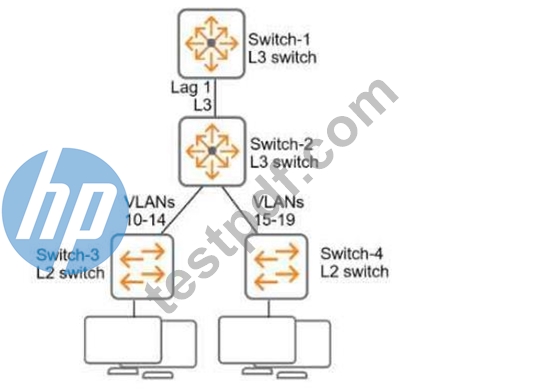
All of the switches in the exhibit are AOS-CX switches.
What is the preferred configuration on Switch-2 for preventing rogue OSPF routers in this network?
- A. Configure passive-interface as the OSPF default and disable OSPF passive on Lag 1.
- B. Configure OSPF authentication on Lag 1 in MD5 mode.
- C. Configure OSPF authentication on VLANs 10-19 in password mode.
- D. Disable OSPF entirely on VLANs 10-19.
Answer: B
Explanation:
Why MD5 Authentication on Lag 1 is Preferred:
* Lag 1 is the primary link between Switch-2 and Switch-1, both of which are Layer 3 switches running OSPF.
* By enabling MD5 authentication, OSPF routers exchange authenticated packets, preventing unauthorized or rogue OSPF routers from forming adjacencies or injecting routes.
* MD5 is a secure authentication method and ensures the integrity and authenticity of OSPF communications.
Other Options Analysis:
* A. Configure OSPF authentication on VLANs 10-19 in password mode: While configuring authentication on VLAN interfaces could secure VLAN-specific OSPF traffic, it is less effective because the main threat of rogue OSPF comes from unauthorized L3 devices connected via the backbone (Lag 1).
* C. Disable OSPF entirely on VLANs 10-19: Disabling OSPF on these VLANs is not a preferred solution because OSPF is needed to route traffic in this design.
* D. Configure passive-interface as the OSPF default and disable OSPF passive on Lag 1: While passive interfaces prevent OSPF from forming adjacencies, it does not directly prevent rogue routers.
Passive mode only limits OSPF advertisements on specific interfaces.
NEW QUESTION # 26
You are setting up policy rules in HPE Aruba Networking SSE. You want to create a single rule that permits users in a particular user group to access multiple applications. What is an easy way to meet this need?
- A. Apply the same tag to the applications; select the tag as a destination in the policy rule.
- B. Select the applications within a non-default web profile; select that profile in the policy rule.
- C. Place all the applications in the same connector zone; select that zone as a destination in the policy rule.
- D. Associate the applications directly with the IdP used to authenticate the users; choose any for the destination in the policy rule.
Answer: A
Explanation:
* Tagging Applications: In HPE Aruba Networking SSE (Secure Service Edge), tagging is an efficient way to group multiple applications together for simplified management and rule creation.
* Tags can be applied to applications, and a single policy rule can be configured to use the tag as the destination.
* This eliminates the need to create multiple rules for each individual application, streamlining policy configuration.
* Option B: Correct. Applying the same tag to multiple applications allows you to select the tag as the destination in a single policy rule, meeting the requirement efficiently.
* Option A: Incorrect. Associating applications with the IdP and selecting "any" for the destination lacks granularity and security.
* Option C: Incorrect. Using connector zones is more appropriate for network-level segmentation rather than grouping application policies.
* Option D: Incorrect. Web profiles are generally used for web-based traffic policies, not for grouping applications in general.
NEW QUESTION # 27
What correctly describes an HPE Aruba Networking AP's Device (TPM) certificate?
- A. It is signed by an HPE Aruba Networking CA and is trusted by many HPE Aruba Networking solutions.
- B. It works well as a captive portal certificate for guest SSIDs.
- C. It is a self-signed certificate that should not be used in production.
- D. It is installed on APs after they connect to and are provisioned by HPE Aruba Networking Central.
Answer: A
Explanation:
An HPE Aruba Networking AP's Device (TPM) certificate is signed by an HPE Aruba Networking Certificate Authority (CA) and is trusted by many HPE Aruba Networking solutions. This certificate is used for secure communications and device authentication within the Aruba network ecosystem.
1.CA-Signed Certificate: The Device (TPM) certificate is signed by a trusted Aruba CA, ensuring its authenticity and integrity.
2.Trust Across Solutions: Because it is signed by an Aruba CA, it is recognized and trusted by various Aruba solutions, facilitating secure interactions and communications.
3.Security: Using a CA-signed certificate enhances the security of the network by preventing unauthorized access and ensuring that communications are secure.
Reference: Aruba's documentation on AP certificates and security protocols outlines the use and trust relationships of Device (TPM) certificates within the Aruba network infrastructure.
NEW QUESTION # 28 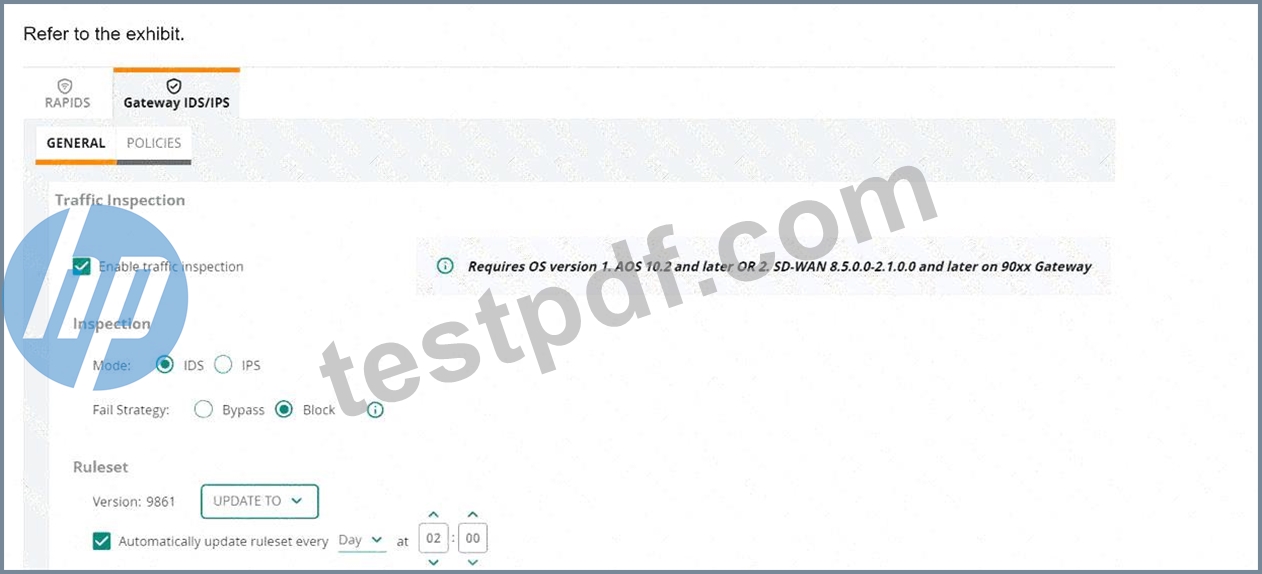
(Note that the HPE Aruba Networking Central interface shown here might look slightly different from what you see in your HPE Aruba Networking Central interface as versions change; however, similar concepts continue to apply.) An HPE Aruba Networking 9x00 gateway is part of an HPE Aruba Networking Central group that has the settings shown in the exhibit. What would cause the gateway to drop traffic as part of its IDPS settings?
- A. Traffic matching a rule in the active ruleset
- B. Its IDPS engine failing
- C. Traffic showing anomalous behavior
- D. Its site-to-site VPN connections failing
Answer: A
Explanation:
In the exhibit, the HPE Aruba Networking Central settings for the 9x00 gateway show that traffic inspection is enabled, and the gateway is set to operate in IDS (Intrusion Detection System) mode with the fail strategy set to "Block". This configuration means that the gateway will drop traffic if it matches a rule in the active ruleset.
1.Active Ruleset: The ruleset version 9861 is active, and the gateway is configured to automatically update the ruleset daily.
2.Traffic Matching Rules: When traffic matches a rule in the active ruleset, it is flagged as suspicious or malicious.
3.Block Mode: Since the fail strategy is set to "Block", any traffic that matches a rule in the active ruleset will be dropped to prevent potential threats.
Reference: The documentation for HPE Aruba Networking Central and gateway IDS/IPS configuration provides detailed information on how traffic is inspected and the implications of different fail strategies, including blocking traffic that matches the active ruleset.
NEW QUESTION # 29
A company has HPE Aruba Networking APs and AOS-CX switches, as well as HPE Aruba Networking ClearPass. The company wants CPPM to have HTTP User- Agent strings to use in profiling devices.
What can you do to support these requirements?
- A. Configure mirror sessions on the APs and switches to copy client HTTP traffic to CPPM.
- B. Schedule periodic subnet scans of all client subnets on CPPM.
- C. Add the CPPM server's IP address to the IP helper list in all client VLANs on routing switches.
- D. On the APs and switches, configure a redirect to ClearPass Guest in the role for devices being profiled.
Answer: C
Explanation:
To support the requirement for HPE Aruba Networking ClearPass Policy Manager (CPPM) to have HTTP User-Agent strings for profiling devices, you should add the CPPM server's IP address to the IP helper list in all client VLANs on routing switches. This configuration ensures that DHCP requests and other relevant client traffic are forwarded to CPPM, allowing it to capture HTTP User-Agent strings and use them for device profiling.
1.IP Helper Configuration: Adding CPPM to the IP helper list ensures that the switch forwards DHCP and other client traffic to CPPM, enabling it to gather necessary information for profiling.
2.User-Agent Strings: By receiving client traffic, CPPM can analyze HTTP headers and capture User-Agent strings, which provide valuable information about the client's device and browser.
3.Profiling Support: This approach supports the comprehensive profiling of devices, allowing CPPM to apply appropriate policies based on detailed device information.
NEW QUESTION # 30
You are setting up an HPE Aruba Networking VIA solution for a company. You need to configure access control policies for applications and resources that remote clients can access when connected to the VPN.
Where on the VPNC should you configure these policies?
- A. In the cloud security settings using IPsec maps
- B. In the roles to which VIA clients are assigned after VIA Web authentication
- C. In the roles to which VIA clients are assigned after IKE authentication
- D. In the tunneled network settings within the VIA Connection Profile
Answer: C
Explanation:
To configure access control policies for applications and resources that remote clients can access when connected to the VPN, you should configure these policies in the roles to which VIA clients are assigned after IKE (Internet Key Exchange) authentication on the VPNC. These roles define the permissions and access controls for the clients once they are authenticated, ensuring that they can only access the applications and resources allowed by their assigned roles.
1.IKE Authentication: After IKE authentication, clients are assigned specific roles that determine their access privileges.
2.Role-Based Access Control: By configuring access control policies within these roles, you can granularly control what resources and applications the remote clients can access over the VPN.
3.Security: This method ensures that access is managed securely and dynamically based on the role assigned to each client after successful authentication.
NEW QUESTION # 31
A company is using HPE Aruba Networking ClearPass Device Insight (CPDI) (the standalone application).
You have identified a device, which is currently
classified as one type, but you want to classify it as a custom type. You also want to classify all devices with similar attributes as this type, both already-discovered devices and new devices discovered later.
What should you do?
- A. In the device details, select filter, create a user tag based on the device attributes, and save the tag.
- B. Create a user rule from the Generic Devices page, select the desired attributes for the rule, and choose
"Save." - C. In the device details, select reclassify, create a user rule based on its attributes, and choose "Save & Reclassify."
- D. Create a user tag from the Generic Devices page, select the desired attributes for the tag, and save the tag.
Answer: C
Explanation:
When using HPE Aruba Networking ClearPass Device Insight (CPDI) and you need to reclassify a device to a custom type and apply this classification to all devices with similar attributes, both already discovered and newly discovered, you should follow these steps:
1.Navigate to the device details in CPDI.
2.Select the option to reclassify the device.
3.Create a user rule based on the desired attributes of the device.
4.Choose the "Save & Reclassify" option.
This process ensures that the device is reclassified according to the new custom type and that the rule is applied to all existing and future devices with matching attributes, maintaining consistent classification across the network.
Reference: The ClearPass Device Insight user guide includes detailed instructions on device classification, rule creation, and managing device attributes to maintain accurate network visibility and security.
NEW QUESTION # 32
A company has HPE Aruba Networking APs, which authenticate users to HPE Aruba Networking ClearPass Policy Manager (CPPM).
What does HPE Aruba Networking recommend as the preferred method for assigning clients to a role on the AOS firewall?
- A. OCreate server rules on the APs to assign clients to roles based on RADIUS IETF attributes returned by CPPM.
- B. Configure CPPM to assign the role using a RADIUS enforcement profile with a RADIUS:IETF Username attribute.
- C. Configure CPPM to assign the role using a RADIUS enforcement profile with an Aruba-User-Role VSA.
- D. Create user rules on the APs to assign clients to roles based on a variety of criteria.
Answer: C
Explanation:
The preferred method for assigning clients to a role on the AOS firewall is to configure HPE Aruba Networking ClearPass Policy Manager (CPPM) to assign the role using a RADIUS enforcement profile with an Aruba-User-Role VSA (Vendor-Specific Attribute). This method allows ClearPass to dynamically assign the appropriate user roles to clients during the authentication process, ensuring that role-based access policies are consistently enforced across the network.
Reference: Aruba ClearPass documentation and RADIUS configuration guides provide detailed instructions on setting up RADIUS enforcement profiles and using the Aruba-User-Role VSA for role assignment.
NEW QUESTION # 33
A company has HPE Aruba Networking APs (AOS-10), which authenticate clients to HPE Aruba Networking ClearPass Policy Manager (CPPM). CPPM is set up to receive a variety of information about clients' profile and posture. New information can mean that CPPM should change a client's enforcement profile.
What should you set up on the APs to help the solution function correctly?
- A. In the WLAN profiles, enable interim RADIUS accounting.
- B. In the RADIUS server settings for CPPM, enable Dynamic Authorization.
- C. In the RADIUS server settings for CPPM, enable querying the authentication status.
- D. In the security settings, configure dynamic denylisting.
Answer: B
Explanation:
To ensure that HPE Aruba Networking APs (AOS-10) properly interact with HPE Aruba Networking ClearPass Policy Manager (CPPM) and dynamically update a client's enforcement profile based on new profile and posture information, you should enable Dynamic Authorization in the RADIUS server settings for CPPM. This allows ClearPass to send Change of Authorization (CoA) requests to the APs, prompting them to reapply the appropriate enforcement profiles based on updated information.
1.Dynamic Authorization: Enabling this feature allows ClearPass to dynamically push changes to the APs whenever there is new relevant information about a client's profile or posture.
2.Change of Authorization (CoA): This mechanism ensures that clients are assigned the correct enforcement profiles in real-time, based on the latest data.
3.Enhanced Policy Enforcement: This setup helps in maintaining accurate and up-to-date policy enforcement for clients on the network.
Reference: ClearPass and AOS-10 documentation on RADIUS server settings and dynamic authorization explain the process and benefits of enabling Dynamic Authorization for real-time policy updates.
NEW QUESTION # 34
You are setting up an HPE Aruba Networking VIA solution for a company. You have already created a VPN pool with IP addresses for the remote clients. During tests, however, the clients do not receive IP addresses from that pool.
What is one setting to check?
- A. That the pool is associated with the role to which the VIA clients are being assigned
- B. That the pool is referenced in the clients' VIA Connection Profile
- C. That the pool uses an IP subnet that is different from any subnet configured on the VPNC
- D. That the pool uses valid, public IP addresses that are assigned to the company
Answer: A
Explanation:
If VIA clients are not receiving IP addresses from the configured VPN pool, one setting to check is whether the pool is associated with the role to which the VIA clients are being assigned. The association between the IP pool and the role ensures that clients assigned to that role receive IP addresses from the correct pool.
1.Role Association: Each role can be associated with a specific IP pool, ensuring that clients assigned to the role receive addresses from the intended pool.
2.IP Allocation: Proper configuration of the IP pool and its association with the role is crucial for correct IP address allocation.
3.VIA Configuration: Ensuring that all settings, including IP pool associations, are correctly configured, facilitates seamless client connectivity.
Reference: Aruba's VIA configuration guides provide detailed steps for setting up VPN pools and associating them with client roles to ensure correct IP address allocation.
NEW QUESTION # 35
Refer to Exhibit:
All of the switches in the exhibit are AOS-CX switches.
What is the preferred configuration on Switch-2 for preventing rogue OSPF routers in this network?
- A. Configure passive-interface as the OSPF default and disable OSPF passive on Lag 1.
- B. Configure OSPF authentication on Lag 1 in MD5 mode.
- C. Configure OSPF authentication on VLANs 10-19 in password mode.
- D. Disable OSPF entirely on VLANs 10-19.
Answer: B
Explanation:
Why MD5 Authentication on Lag 1 is Preferred:
* Lag 1 is the primary link between Switch-2 and Switch-1, both of which are Layer 3 switches running OSPF.
* By enabling MD5 authentication, OSPF routers exchange authenticated packets, preventing unauthorized or rogue OSPF routers from forming adjacencies or injecting routes.
* MD5 is a secure authentication method and ensures the integrity and authenticity of OSPF communications.
Other Options Analysis:
* A. Configure OSPF authentication on VLANs 10-19 in password mode: While configuring authentication on VLAN interfaces could secure VLAN-specific OSPF traffic, it is less effective because the main threat of rogue OSPF comes from unauthorized L3 devices connected via the backbone (Lag 1).
* C. Disable OSPF entirely on VLANs 10-19: Disabling OSPF on these VLANs is not a preferred solution because OSPF is needed to route traffic in this design.
* D. Configure passive-interface as the OSPF default and disable OSPF passive on Lag 1: While passive interfaces prevent OSPF from forming adjacencies, it does not directly prevent rogue routers. Passive mode only limits OSPF advertisements on specific interfaces.
NEW QUESTION # 36
You are setting up HPE Aruba Networking SSE to prohibit users from uploading and downloading files from Dropbox. What is part of the process?
- A. Deploying a connector that can reach the remote users
- B. Installing the HPE Aruba Networking SSE root certificate on clients
- C. Deploying a connector that can reach Dropbox
- D. Adding a web category that includes Dropbox
Answer: D
Explanation:
Comprehensive Detailed Explanation
To prohibit users from uploading and downloading files from Dropbox using HPE Aruba Networking SSE (Secure Service Edge), you need to configure web access policies. This typically involves:
* Adding a web category to the SSE configuration that includes Dropbox.
* The SSE solution uses category-based filtering to block access to specific applications or services, such as Dropbox, based on their classification.
Other Options:
* B. Installing the SSE root certificate is required for enabling SSL inspection, but this does not directly control access to Dropbox.
* C and D. Deploying a connector is not necessary for this purpose as the enforcement is done via SSE policies, not by directly interfacing with Dropbox or remote users.
References
* Aruba Networking SSE documentation on web filtering policies.
* HPE Aruba SSE Application Control Best Practices Guide.
NEW QUESTION # 37
You are configuring the HPE Aruba Networking ClearPass Device Insight Integration settings on ClearPass Policy Manager (CPPM). For which use case should you set the 'Tag Updates Action" to " apply for all tag updates"?
- A. When you plan to have CPPM issue CoAs for clients with new tags, but do not want to have to list those specific tags in the Device Integration settings in advance.
- B. When Device Insight tags are only used to identify dangerous devices, and you want to disconnect those devices without having to set up new rules in enforcement policies.
- C. When CPPM is gathering posture information for CPDI, and you want CPDI to always have access to the most up-to-date information.
- D. When the Device Insight integration poll interval is set to a relatively long interval but you still want CPPM to be informed quickly about devices' new tags.
Answer: A
Explanation:
* Tag Updates Action - "Apply for All Tag Updates":
* This setting ensures that all updated tags from Device Insight (CPDI) are applied dynamically.
* It is particularly useful when you want to trigger Change of Authorization (CoA) without explicitly predefining the tag values.
* Option D: Correct. This setting allows CPPM to issue CoAs automatically for updated tags without requiring prior configuration of specific tags.
* Option A: Incorrect. The setting is not directly related to reducing the poll interval latency.
* Option B: Incorrect. Disconnecting devices based on dangerous tags would require predefined enforcement rules.
* Option C: Incorrect. Posture information updates do not directly rely on this setting.
NEW QUESTION # 38
A company wants to implement Virtual Network based Tunneling (VNBT) on a particular group of users and assign those users to an overlay network with VNI
3000.
Assume that an AOS-CX switch is already set up to:
. Implement 802.1X to HPE Aruba Networking ClearPass Policy Manager (CPPM)
. Participate in an EVPN VXLAN solution that includes VNI 3000
Which setting should you configure in the users' AOS-CX role to apply VNBT to them when they connect?
- A. Gateway zone set to "3000" with no gateway role set
- B. Access VLAN set to the VLAN mapped to VNI 3000
- C. Access VLAN ID set to "3000"
- D. Gateway zone set to "vni-3000" with no gateway role set
Answer: B
Explanation:
To apply Virtual Network based Tunneling (VNBT) to a particular group of users and assign them to an overlay network with VNI 3000, you should configure the users' AOS-CX role to set the Access VLAN to the VLAN mapped to VNI 3000. This ensures that when users connect, their traffic is tunneled through the specified VNI, integrating seamlessly with the EVPN VXLAN solution.
1.Access VLAN Configuration: Setting the Access VLAN to the VLAN mapped to VNI 3000 ensures that users' traffic is directed to the correct virtual network.
2.EVPN VXLAN Integration: This setup allows the AOS-CX switch to participate in the EVPN VXLAN solution, ensuring that user traffic is properly encapsulated and tunneled.
3.Role-Based Assignment: Configuring the role with the correct VLAN mapping ensures that users are dynamically assigned to the appropriate virtual network based on their role.
Reference: Aruba's documentation on AOS-CX configuration and VXLAN integration provides detailed steps for setting up VNBT and role-based VLAN assignments.
NEW QUESTION # 39
HPE Aruba Networking Central displays an alert about an Infrastructure Attack that was detected. You go to the Security > RAPIDS events and see that the attack was "Detect adhoc using Valid SSID." What is one possible next step?
- A. Look for the IP address associated with the offender and then check for that IP address among HPE Aruba Networking Central clients.
- B. Use HPE Aruba Networking Central floorplans or the detecting AP identities to locate the general area for the threat.
- C. Make sure that clients have updated drivers, as faulty drivers are a common explanation for this attack type.
- D. Make sure that you have tuned the threshold for that check as false positives are common for it.
Answer: B
Explanation:
* RAPIDS Ad-Hoc Detection:
* The alert "Detect ad-hoc using Valid SSID" indicates that a device is broadcasting an SSID that matches a valid network SSID in ad-hoc mode. This can be an indication of an infrastructure attack or misconfiguration.
* Next Steps:
* Use Aruba Central floorplans or AP location data to identify the physical area where the offending device is detected.
* Locate and investigate the device to determine if it is malicious or simply misconfigured.
* Option Analysis:
* Option A: Incorrect. While tuning thresholds is useful for reducing false positives, this step does not directly address a potential threat.
* Option B: Incorrect. Faulty drivers can cause similar behavior, but this step is not immediately actionable without locating the device first.
* Option C: Correct. Floorplans or AP identities help locate the threat's physical area for further investigation.
* Option D: Incorrect. RAPIDS focuses on detecting devices via SSID and MAC, not IP addresses, making this approach less relevant.
NEW QUESTION # 40
You have run an Active Endpoint Security Report on HPE Aruba Networking ClearPass. The report indicates that hundreds of endpoints have MAC addresses but no known IP addresses.
What is one step for addressing this issue?
- A. Set up network devices to implement RADIUS accounting to CPPM.
- B. Configure CPPM as a Syslog destination on network devices.
- C. Add CPPM's IP address to the IP helper list on routing switches.
- D. Set up switches to implement ARP inspection on client VLANs.
Answer: C
Explanation:
When the Active Endpoint Security Report on HPE Aruba Networking ClearPass indicates that endpoints have MAC addresses but no known IP addresses, one effective step to address this issue is to add CPPM's (ClearPass Policy Manager) IP address to the IP helper list on routing switches. This configuration ensures that DHCP requests are forwarded to the ClearPass server, allowing it to track and report the IP addresses assigned to the endpoints. This helps ClearPass maintain an accurate mapping of MAC addresses to IP addresses, improving endpoint visibility and security management.
NEW QUESTION # 41
What is a use case for running periodic subnet scans on devices from HPE Aruba Networking ClearPass Policy Manager (CPPM)?
- A. Identifying issues with authenticating and authorizing clients
- B. Using DHCP fingerprints to determine a client's device category and OS
- C. Using WMI to collect additional information about Windows domain clients
- D. Detecting devices that fail to comply with rules defined in CPPM posture policies
Answer: B
Explanation:
Running periodic subnet scans on devices from HPE Aruba Networking ClearPass Policy Manager (CPPM) can be used to gather DHCP fingerprints, which help determine a client's device category and operating system. DHCP fingerprints are unique patterns in DHCP request packets that provide valuable information about the device type and OS, assisting in device profiling and policy enforcement.
1.DHCP Fingerprinting: This technique captures specific details from DHCP packets to identify the type and operating system of a device.
2.Device Profiling: By running subnet scans, CPPM can continuously update its device database with accurate profiles, ensuring that policies are applied correctly based on the device type.
3.Network Visibility: Regular scanning helps maintain up-to-date visibility of all devices on the network, improving security and management.
NEW QUESTION # 42
You are setting up an HPE Aruba Networking VIA solution for a company. You need to configure access control policies for applications and resources that remote clients can access when connected to the VPN.
Where on the VPNC should you configure these policies?
- A. In the cloud security settings using IPsec maps
- B. In the roles to which VIA clients are assigned after VIA Web authentication
- C. In the roles to which VIA clients are assigned after IKE authentication
- D. In the tunneled network settings within the VIA Connection Profile
Answer: C
Explanation:
To configure access control policies for applications and resources that remote clients can access when connected to the VPN, you should configure these policies in the roles to which VIA clients are assigned after IKE (Internet Key Exchange) authentication on the VPNC. These roles define the permissions and access controls for the clients once they are authenticated, ensuring that they can only access the applications and resources allowed by their assigned roles.
1.IKE Authentication: After IKE authentication, clients are assigned specific roles that determine their access privileges.
2.Role-Based Access Control: By configuring access control policies within these roles, you can granularly control what resources and applications the remote clients can access over the VPN.
3.Security: This method ensures that access is managed securely and dynamically based on the role assigned to each client after successful authentication.
Reference: Aruba's VPN and VIA deployment guides provide detailed instructions on configuring roles and access control policies for remote VPN clients.
NEW QUESTION # 43
HPE Aruba Networking ClearPass Policy Manager (CPPM) uses a service to authenticate clients. You are now adding the Endpoints Repository as an authorization source for the service, and you want to add rules to the service's policies that apply different access levels based, in part, on a client's device category. You need to ensure that CPPM can apply the new correct access level after discovering new clients' categories.
What should you enable on the service?
- A. The Posture Compliance option in the Service tab
- B. The Use cached Roles and Posture attributes from previous sessions option in the Enforcement tab
- C. The Profile Endpoints option in the Service tab
- D. The Audit End-host option in the Service tab
Answer: C
Explanation:
To ensure that HPE Aruba Networking ClearPass Policy Manager (CPPM) can apply the correct access levels based on a client's device category after discovering new clients, you need to enable the "Profile Endpoints" option in the Service tab. This option allows CPPM to profile and categorize endpoints dynamically, ensuring that the appropriate access levels are applied based on the device's characteristics. Enabling this feature ensures that new devices are accurately profiled and that access policies can be enforced based on the updated device information.
NEW QUESTION # 44
A company has HPE Aruba Networking Central-managed APs. The company wants to block all clients connected through the APs from using YouTube.
Which steps should you take?
- A. Enable WebCC on all client firewall roles. Then, create WebCC category rules that deny suspicious URLs.
- B. Enable DPI. Then, create application rules to deny YouTube on the firewall roles.
- C. Deploy gateways and have the APs tunnel traffic to the gateways. Then, enable the gateway IDS/IPS engine.
- D. Enable Client IPS at the "custom" level, and then specify the check for YouTube.
Answer: B
Explanation:
To block all clients connected through HPE Aruba Networking Central-managed APs from accessing YouTube, you should enable DPI (Deep Packet Inspection) and then create application rules to deny YouTube on the firewall roles. DPI allows the network to inspect and classify traffic based on application signatures, making it possible to enforce application-specific policies. By creating rules that specifically block YouTube traffic, you can effectively prevent clients from accessing the service.
Reference: Aruba Central's documentation on firewall and application control provides detailed instructions on enabling DPI and creating application rules to manage and restrict access to specific applications such as YouTube.
NEW QUESTION # 45
A company has a variety of HPE Aruba Networking solutions, including an HPE Aruba Networking infrastructure and HPE Aruba Networking ClearPass Policy Manager (CPPM). The company passes traffic from the corporate LAN destined to the data center through a third-party SRX firewall. The company would like to further protect itself from internal threats. What is one solution that you can recommend?
- A. Configure CPPM to poll the third-party firewall for a broad array of information about internal clients, such as profile and posture.
- B. Add ClearPass Device Insight (CPDI) to the solution, integrate it with the third-party firewall to develop more complete device profiles.
- C. Have the third-party firewall send Syslogs to CPPM, which can work with network devices to lock internal attackers out of the network.
- D. Use tunnel mode SSIDs and user-based tunneling (UBT) on AOS-CX switches to pass all internal traffic directly through the third-party firewall.
Answer: C
Explanation:
* Syslog Integration with CPPM:
* ClearPass Policy Manager (CPPM) can integrate with third-party firewalls via Syslog messages to detect and respond to internal threats.
* The Syslog integration enables CPPM to gather context on suspicious activity and enforce appropriate policies such as isolating attackers by working with network devices like Aruba switches and APs.
* Option A: Correct. This method allows for dynamic response to threats and leverages existing infrastructure without requiring major reconfiguration.
* Option B: Incorrect. CPDI is primarily used for profiling devices, not directly for threat response based on Syslog information.
* Option C: Incorrect. While it is possible for CPPM to poll information, this approach is less dynamic and not focused on immediate threat response.
* Option D: Incorrect. Tunnel mode SSIDs and UBT are designed for forwarding user traffic securely but do not directly enhance threat detection or mitigation.
NEW QUESTION # 46
......
HPE7-A02 exam is designed to evaluate the candidate’s knowledge and expertise in network security and to demonstrate their ability to implement and manage secure wireless networks. HPE7-A02 exam includes multiple-choice questions and scenario-based questions that test the candidate’s understanding and expertise in critical areas such as enterprise wireless security, secure network access control, secure remote access, and security monitoring and analysis.
Detailed New HPE7-A02 Exam Questions for Concept Clearance: https://braindumps.testpdf.com/HPE7-A02-practice-test.html
